This article will guide you through the steps required to instantiate UVI Player in an instrument track in MOTU Digital Performer:
-
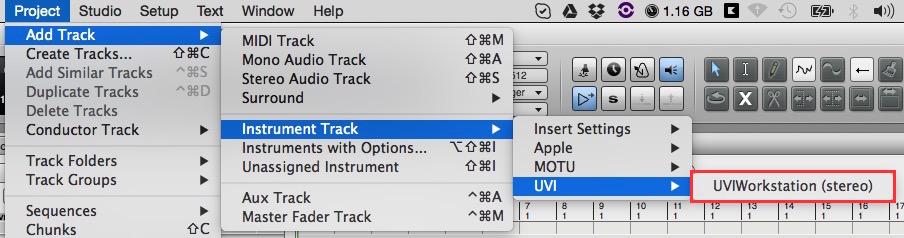
Go to the Project menu then Add Track > Instrument Track > UVI > UVIPlayer (stereo).
-
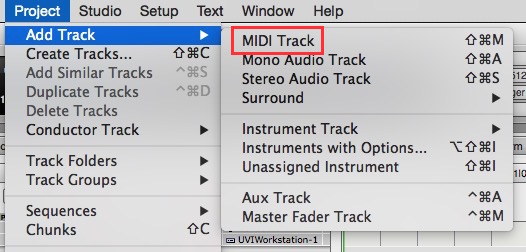
Create a MIDI Track.
-
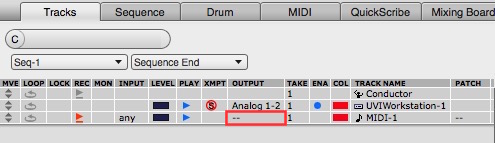
Choose UVIPlayer-1-1 as the output for this MIDI track.

-
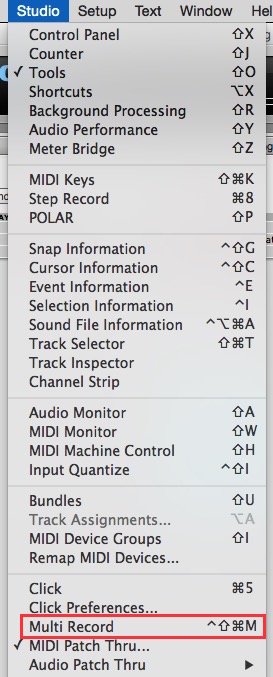
Activate the Multi Record option from the Studio menu – this will add the MIDI input column, which allows you to select your MIDI controller input.

-
Activate the Record Enable button then select a preset in UVI Player and enjoy!

Note: if UVI Player is not listed as a plug-in in Digital Performer, you can read the article UVI Player not Showing up in my DAW.